
Employee Tenure Calculator: How to Calculate Years of Service Accurately
TL;DR: This guide explains what an Employee Tenure Calculator is and why it matters for HR teams. You will learn the exact formula to calculate individual and company-wide tenure. Accurate tracking ensures correct payroll processing, fair benefits distribution, and better employee retention. Use our free online calculator to instantly find precise service durations in years, months, and days.
Currently, most companies track employee joining dates, but calculating exact work duration manually can be confusing and time-consuming. Because of this, small errors in tenure calculation can negatively affect payroll processing, benefit distribution, and vital HR decisions. In this guide, you will learn how an Employee Tenure Calculator works and how to calculate tenure accurately step by step.
Key Takeaways
- Employee Tenure Calculator measures how long an employee has worked in a company.
- Employee tenure is calculated by subtracting the joining date from the current or exit date.
- Tenure can be expressed in years, months, or days depending on the requirement.
- Employee tenure helps HR teams track experience and retention.
- Accurate tenure calculation is important for payroll, benefits, and reporting.
What Is an Employee Tenure Calculator?
Specifically, an employee tenure calculator is a digital tool that HR teams use to determine exactly how long a person has worked at a company. It measures the time elapsed between an employee’s start date and their end date or the current date. For example, you might hire someone on January 1, 2020, and want to know their exact service time today. This tool instantly calculates the total years, months, and days.
Furthermore, this tool is highly versatile for different HR functions. You can use it to measure individual service length or calculate the average tenure of your entire workforce. For example, a business owner might plug in the start dates of 50 employees to find out that their average staff retention is 4.5 years. This data helps companies understand their overall stability and employee satisfaction levels.
Additionally, automating this process saves administrative time. You can easily find a reliable date difference calculator on our platform to handle these computations. For example, instead of counting leap years manually, the software instantly processes the exact calendar days. By using this tool, you can skip complex manual math and avoid costly date-counting errors.
Why Does Employee Tenure Matter in HR?
Fundamentally, employee tenure matters in HR because it directly impacts employee benefits, payroll calculations, and overall company retention strategies. Tracking this metric helps organizations measure workforce stability and identify potential management issues. For example, if a department shows an average tenure of just six months, HR can immediately investigate potential leadership or workload problems. Consequently, understanding these patterns allows businesses to improve their workplace culture.
Moreover, accurate tenure data is legally and financially necessary for most businesses. Companies use this exact measurement to calculate retirement vesting, vacation accruals, and loyalty bonuses. For example, an employee might need exactly three years of service to qualify for a matching 401(k) contribution. Therefore, precise tracking ensures that employees receive their correct benefits while keeping the company compliant with labor laws.
Additionally, tenure is a strong indicator of financial efficiency. High turnover rates cost companies significant money in recruiting and training new staff. For example, replacing an employee can cost up to 50% to 200% of their annual salary according to industry studies. By monitoring tenure, you can reduce these expenses and improve your overall revenue per employee.
What Is the Employee Tenure Formula?
Technically, the employee tenure formula is a mathematical equation used to find the exact duration of a worker’s employment. For an individual, the formula simply subtracts the start date from the end date. For an entire company, the formula divides the combined years of service by the total number of employees.
Individual Tenure = End Date – Start Date
Average Company Tenure = Total Combined Years of Service / Total Number of Employees
First, let us look at the individual formula. This calculation requires only two specific data points to work. For example, an employee starts on January 1, 2021, and leaves on January 1, 2024. Their individual tenure is exactly three years, which is the foundation of all HR service calculations.
Next, you can apply the average tenure formula to evaluate your whole team. This method requires adding up the service time of everyone currently on your payroll. For example, you have 10 employees who have worked a combined total of 50 years. Your average company tenure is 5 years, which helps executives compare their retention success against industry benchmarks.
How Do You Calculate Employee Tenure Step by Step?
Practically, you calculate employee tenure by gathering accurate start and end dates, performing the date subtraction, and converting the result into years, months, or days. This process ensures that HR records match actual time worked. For example, calculating a five-year work history requires accounting for leap years and different month lengths. Let us explore the specific steps for both individuals and groups.
Calculating Individual Employee Tenure
First, you must locate the exact official start date in your HR records. This date should reflect their first day of paid work, not the day they signed their offer letter. For example, someone signed a contract on May 1 but started working on May 15. Therefore, you must use May 15 as the start date to prevent skewed benefit calculations.
Second, you need to determine the correct end date for the calculation. If the employee still works for you, use today’s date. For example, you are running a payroll report on October 1. You must use October 1 as the end point. Conversely, if the employee has resigned, use their final day of employment.
Third, subtract the start date from the end date using a standard calendar method. You can do this manually, but it is much faster to use a time duration calculator. For example, subtracting March 10, 2022, from March 10, 2024, yields exactly two years. By following these steps, you can achieve perfect accuracy for every staff member.
Calculating Average Tenure for a Company
First, compile a complete list of all active employees in your organization. You should exclude temporary workers or independent contractors from this specific list. For example, a restaurant manager would list their 20 full-time staff members but leave out the freelance graphic designer. This ensures your data accurately reflects your core workforce.
Next, calculate the individual tenure for every person on that list. You must convert all these durations into a single unit, usually years or months, for consistency. For example, an employee has worked for 18 months. You record their time as 1.5 years to ensure uniform data formatting for mathematical averages.
Finally, add all those individual durations together and divide by your total headcount. This final step gives you the company-wide average. For example, 20 employees have a combined total of 80 years of service. Your average tenure is 4 years, which you can compare to the median US employee tenure of 4.3 years for men and 3.8 years for women.
What Are the Different Ways to Measure Tenure?
Generally, you can measure employee tenure in years, months, or days depending on your specific reporting needs. Years are best for long-term retention tracking. Months are ideal for probationary periods. Days are necessary for precise payroll calculations.
| Measurement Unit | Best Used For | Example Scenario |
|---|---|---|
| Years | Long-term tracking, retirement vesting, loyalty awards | Checking if an employee qualifies for a 5-year sabbatical. |
| Months | Probationary periods, performance reviews, short-term tracking | Evaluating a new hire after their first 3 months on the job. |
| Days | Final paychecks, precise benefit accruals, legal compliance | Calculating exact vacation payout for an employee leaving after 412 days. |
First, measuring in years provides a broad view of company loyalty. This metric is standard for annual reports and executive summaries. For example, a CEO might proudly announce that the executive team has an average tenure of 8 years. This high-level view demonstrates stability to investors and potential hires.
Second, measuring in months helps managers track short-term development. This is especially useful during the onboarding phase. For example, many companies schedule formal performance reviews at the 3-month and 6-month marks. By tracking months, managers know exactly when to schedule these critical feedback sessions.
Finally, measuring in days offers the ultimate precision required by accounting departments. Payroll systems rely on exact daily calculations to disburse funds accurately. For example, you need to calculate a prorated final paycheck. You must know the exact number of days worked in that specific pay period to prevent costly wage disputes.
How Can You Use an Employee Tenure Calculator?
Functionally, you use an employee tenure calculator by entering the employee’s start and end dates. Then, you click calculate to see the exact duration. Personally, we designed this calculator to provide precise results based on verified formulas. The tool is built to help students, engineers, teachers, and everyday users perform calculations quickly without needing manual formulas.
First, gather your necessary dates before opening the tool. You will need access to your company’s official employment records. For example, open your HR software and locate the specific hiring dates for the department you want to analyze. Preparation makes the calculation process much faster.
Second, navigate to the calculator on Calculatorspedia and input your data. The interface is designed to be intuitive and user-friendly. For example, you can select dates from a drop-down calendar instead of typing them manually. This feature eliminates formatting errors like mixing up the month and day.
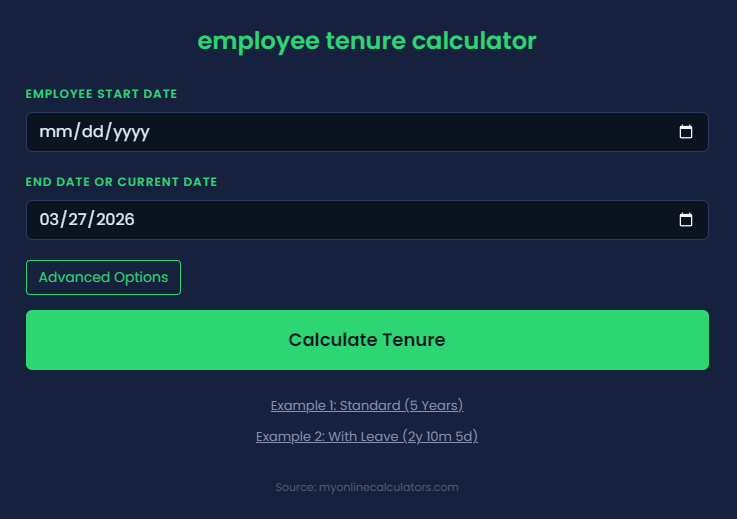
Third, review the generated results and export them to your records. The calculator will break down the exact time into years, months, and days. For example, the tool might show 3 years, 2 months, and 14 days instead of just a generic 3 years. You can copy this precise data directly into your payroll spreadsheet or employee file.
What Are Real Examples of Tenure Calculation?
Contextually, real examples of tenure calculation involve finding the exact work duration for new hires, long-term staff, and entire corporate departments. These scenarios demonstrate how the formula works in everyday business situations. For example, calculating tenure for a recent hire looks very different than calculating the average for a 50-person team. Let us explore some practical examples.
First, consider calculating the tenure of a short-term employee. Suppose Sarah started her job on March 1, 2023, and resigned on August 15, 2023. By subtracting the start date from the end date, we find her tenure is exactly 5 months and 14 days. HR will use this exact figure to calculate her final prorated benefits.
Second, let us look at a long-term employee scenario. John joined his company on February 10, 2010. Today is February 10, 2024. His total tenure is exactly 14 years. For example, because he has passed the 10-year mark, HR might use this data to issue a special loyalty bonus.
Third, we can examine a company-wide average calculation. A small retail store has five employees with the following tenures: 1 year, 2 years, 2 years, 4 years, and 6 years. The combined total is 15 years. For example, by dividing 15 by 5 employees, we find the average tenure is 3 years. This tells the store owner that their team is relatively stable.
What Should You Do After Calculating Employee Tenure?
Strategically, after calculating employee tenure, you should analyze the data to identify retention trends, update your payroll systems, and reward loyal employees. This information is only valuable if you use it to make strategic business decisions. For example, if you notice your average tenure dropping, you can proactively implement new employee retention strategies.
First, use the data to audit your compensation packages. Compare the tenure of your staff against their current pay rates. For example, you have a highly skilled employee with a 7-year tenure who is paid below market rate. You should adjust their salary immediately because proactive raises prevent your best talent from leaving for better offers.
Second, analyze your turnover rate by department. Look for areas where tenure is unusually low. For example, the sales team has an average tenure of 8 months. The marketing team averages 4 years. This indicates a management issue in sales, and you can use our turnover rate calculator to dig deeper into these specific departmental metrics.
Finally, implement a recognition program based on your tenure data. Acknowledging milestones boosts morale and encourages others to stay. For example, you can automatically send a gift card and a personalized note to employees on their work anniversaries. By doing this, you build a positive culture that naturally increases overall company tenure.
Use our Sell-Through Rate Calculator to measure how quickly your inventory is sold and evaluate sales performance efficiently.
Conclusion
In summary, accurately calculating employee tenure is a fundamental task for any successful HR department. By understanding the formula and utilizing digital tools, you can ensure precise payroll processing and track the overall health of your workplace. Longer tenures generally lead to higher productivity, better morale, and reduced hiring costs. For example, retaining a trained employee is always cheaper than hiring a new one. We encourage you to use the Employee Tenure Calculator on calculatorspedia.com to streamline your HR reporting today.
Written by: Riya Sharma Financial Analyst CFA, MSc Finance
Reviewed by: Arjun Menon Chartered Accountant CA, MBA Finance
Disclaimer: This article was initially drafted using AI assistance. However, the content has undergone thorough revisions, editing, and fact-checking by human editors and subject matter experts to ensure accuracy.